
See who is online
Your dashboard shows who is signed in and working in your organization, or in an organization beneath it, right now.
Where to look
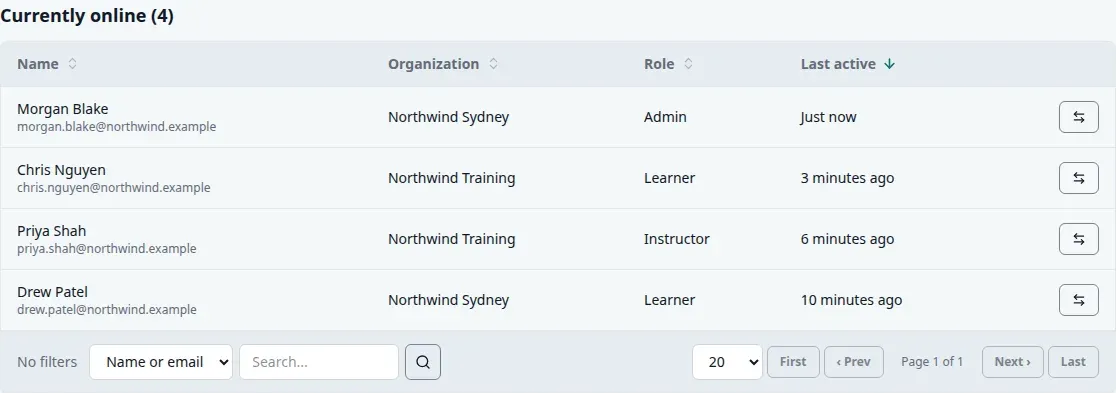
- Currently online (N), at the bottom after the activity chart, says how many people are online and lists them: name and email, the organization they were last working in, their role there, and when they were last active. The most recently active are first.
- Search by name or email, filter by role, sort by any column, and choose how many rows a page shows, as on other lists.
- The list refreshes every five minutes while you are using the dashboard.
- When nobody else is online, the list isn’t shown at all. It appears at the next refresh after someone signs in.
Who counts as online
- Someone who has used Acadenix in one of your organizations within the last hour, and hasn’t signed out. Signing out takes them off the list straight away.
- Only what they do in your organizations counts. Someone who belongs to yours but is working in another organization isn’t listed, and nothing is said about organizations beside or above yours.
- You aren’t listed, and nor is anyone being impersonated: impersonating someone doesn’t make them online.
Impersonate from the list
The switch icon (two arrows) on the right of a row opens the same confirmation as on Users. It appears only on the rows of people you may impersonate; instructors see it on learners only. See Impersonate a user. The person isn’t told.
If this didn’t help
Ask Nix to log a support ticket, or open Support under Need help?.
Copyright © 2026 Acadenix.com