
The leaderboard on your dashboard
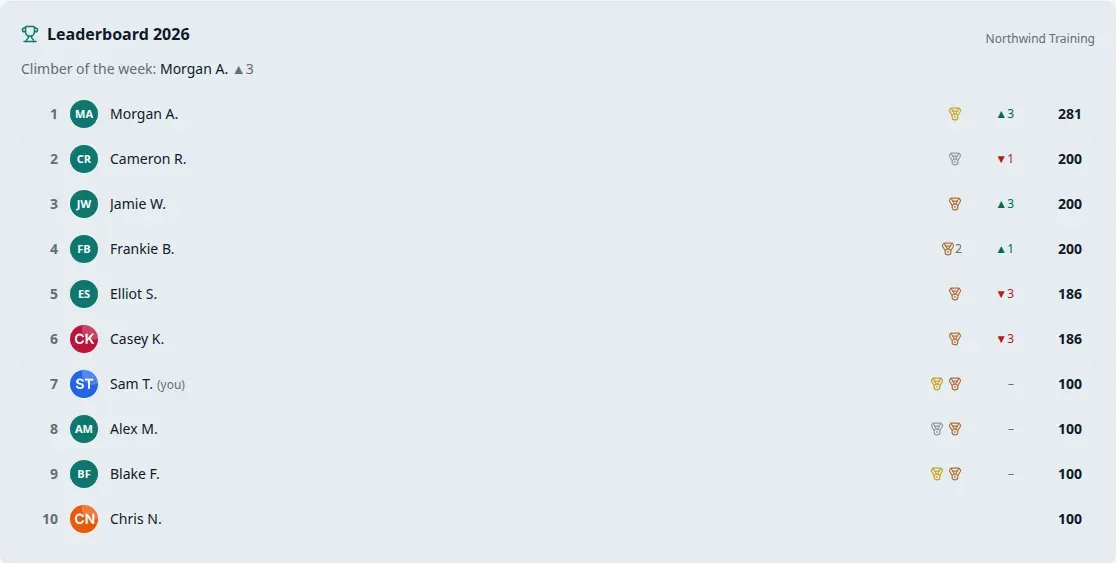
Leaderboard on your dashboard ranks the learners of your organization this year. It shows the top 10, and your own place if you’re further down.
How points work
- Each course you complete earns points: how well you did, out of 100. It’s the average of your marks in the course’s interactive units and its test, every attempt included, so a retry counts. A course with no marks earns 100.
- Your points are the total for the year so far. The board starts again on 1 January.
- A tie goes to whoever reached the total first.
Good to know
- ▲ and ▼ show the places someone gained or lost since Monday. Climber of the week is whoever gained the most.
- Only your organization is on your board. People in other organizations never see you on theirs.
- To appear without your name and photo, untick Show my name and photo on leaderboards in your profile. You then show as your initials, and still rank.
- No leaderboard? Your organization’s plan doesn’t include it.
If this didn’t help
Ask Nix to log a support ticket, or open Support under Need help?.
Copyright © 2026 Acadenix.com