
Find and open your courses
Your courses, and the ones you can buy, are on the Courses page.
Steps
-
In the sidebar, choose Courses.
-
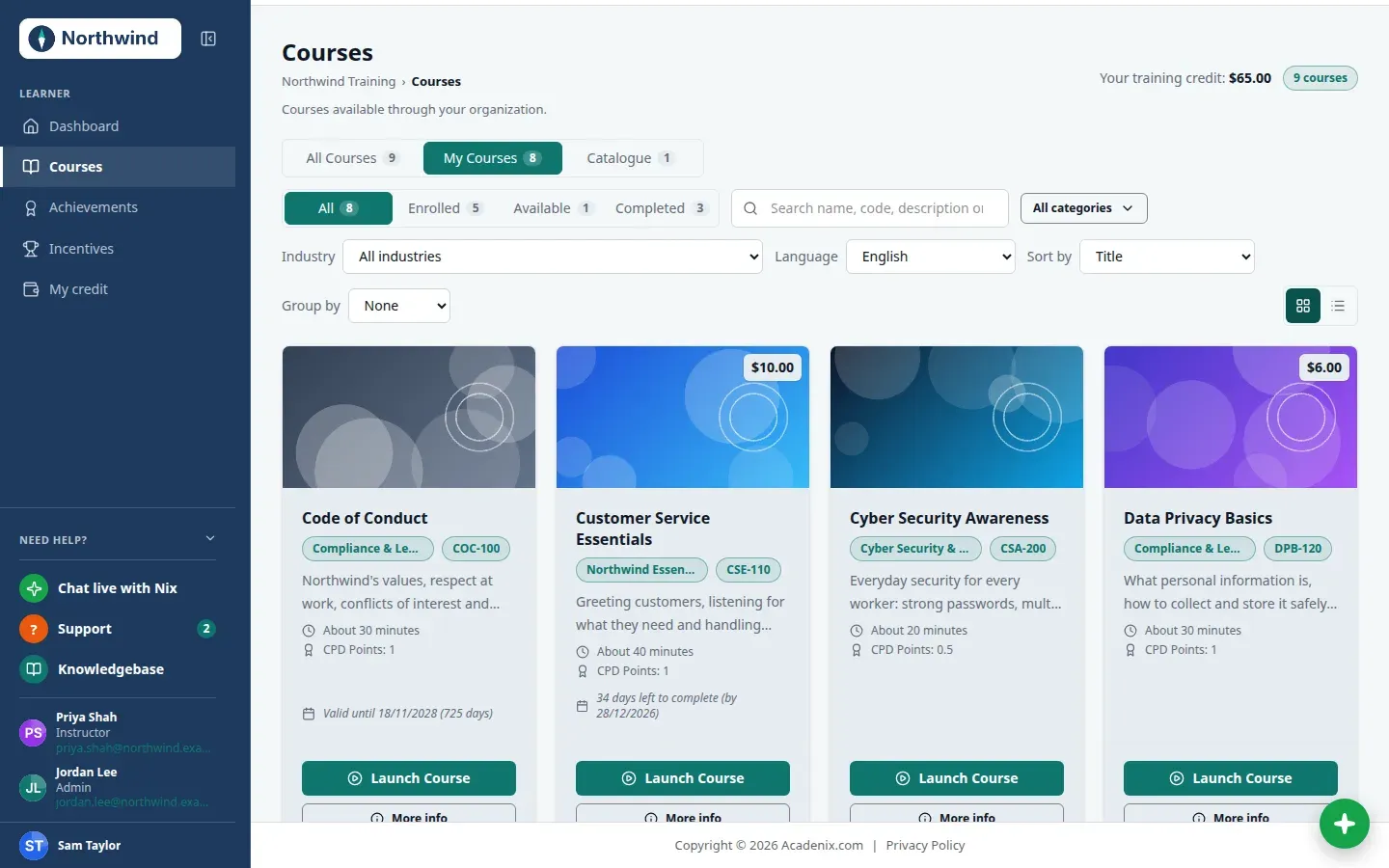
Choose which courses to show, from the top row:
- My Courses, the page’s first choice: the courses you’re enrolled in or have finished, and the free ones open to you.
- Catalogue: courses with a price that you haven’t bought yet.
- All Courses: both together.
Each shows how many courses it holds.
-
Find the course. You can type in the search box, show All, Enrolled, Available or Completed courses, pick categories under All categories, or change the order with Sort by.
Industry and Language show the courses for an industry and in a language. They start on your organization’s; choose All industries or All languages to see everything. A course for all industries shows under every industry, and an industry includes its sectors.
Group by puts courses under category headings (Category), under industry headings (Industry) or in one list (None), in the Sort by order: by title unless you change it. Under headings, Collapse all closes every heading and Expand all opens them again.
-
On the course:
- Launch Course opens a course you are already enrolled in.
- Enroll Now enrols you in a course that is open to you.
- More info shows what a course contains before you enrol. You can enrol from there with Enrol in this course.
Good to know
- The two buttons at the right switch between a grid and a list. The page remembers your choice of courses, view, order, grouping and filter.
- Once you change Industry or Language, the page keeps your choice, even if your organization’s changes. Reset to my organization’s follows your organization again.
- On your dashboard, Courses Available, Courses Enrolled, Courses In Progress and Courses Completed open Courses showing just those courses. Courses Available counts the courses you can enrol in now.
- If a course needs another course first, it says which one. Complete that course, then enrol.
- If you were withdrawn from a course and can join it again, Enrol again carries on where you left off.
- A course you have finished stays finished. You can open it again to review it, and that doesn’t change your result.
- If a course you expect isn’t there, it hasn’t been made available to you yet. Your organization’s administrators decide which courses you see.
- A course that isn’t in your catalogue may be for another audience. Your administrator decides, or may give you a PIN. See Join an audience.
If this didn’t help
Ask Nix to log a support ticket, or open Support under Need help?.
Copyright © 2026 Acadenix.com