
Join an audience
An audience is a group of people who see the same courses. Your catalogue shows the courses for your audiences. Your administrator may give you a PIN to join one yourself.
Steps
-
At the bottom of the sidebar, choose your name, then Profile.
-
Under My audiences, in Join an audience, choose the audience.
-
Enter the PIN and choose Join.
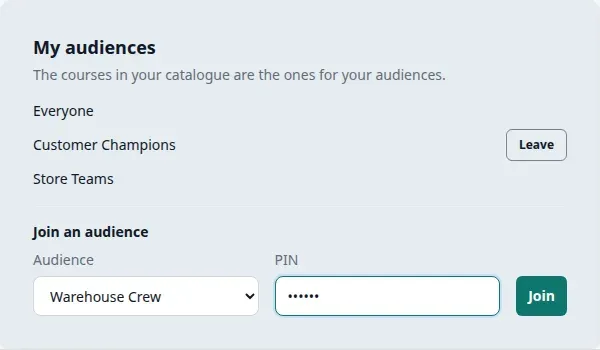
Its courses now appear in your catalogue.
Leave an audience
Leave shows beside an audience you joined yourself. Audiences your administrator put you in, and Everyone, stay until they change them.
Good to know
- A wrong PIN, or an audience you can’t join, says The audience or PIN is wrong.
- After five tries, wait ten minutes before trying again.
- Leaving an audience never takes you off a course you’re on.
If this didn’t help
Ask Nix to log a support ticket, or open Support under Need help?.
Copyright © 2026 Acadenix.com