
Tiers, licences and seats
What your organization can do depends on its licences and its tier. See your organization’s licences shows where to find yours.
Licences
- Platform makes your organization a customer in its own right.
- LMS turns on learning and the Learning Management part of the sidebar. It sets your learner seats and carries your tier.
Without a licence of its own, your organization uses one provided by an organization above, and its learners count against that licence’s seats.
Tiers
Features follow your organization’s own tier, never the tier of a licence provided from above.
- Every plan: courses with SCORM units, tests and certificates; reports; sign-in by email code, Google, Microsoft or LinkedIn; AI help for administrators.
- Bronze adds adding and editing your own courses and tests, and a corporate theme. Its learners have AI help too for now, though Bronze isn’t sold with it.
- Silver adds AI help for learners, CSV export, selling courses and reselling the LMS.
- Gold adds SAML single sign-on and up to five custom domains.
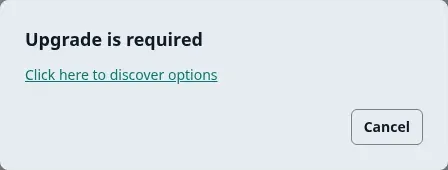
With no tier of its own, your organization has the every-plan features for the courses it is given, and none of the others, except that its learners get AI help when the licence it uses from above is Silver or Gold. Choosing something your tier doesn’t include opens Upgrade is required: Click here to discover options opens your seller’s plans or website. A feature marked (coming soon) on the plans isn’t available yet.
Seats
- Learner seats. Someone takes a seat at their first enrolment and keeps it after they finish. Archiving them frees it. Administrators who never enrol take none.
- Concurrent learners. A seat is taken while someone has a unit or test open, and freed when they sign out or stop learning for a while. Signing in and administration never take one.
When seats run out
- Nobody new can be enrolled, and the message says why. People already enrolled carry on, and can be enrolled in more courses.
- Over your seats, for example after buying fewer, a banner says so. Nobody loses access. Archive learners who no longer need it, or buy more seats.
- At the concurrent limit, a learner opening a unit or test is asked to try again shortly.
Evaluations
An evaluation is 14 days of Bronze for 25 learners, with each unit and test open for 2 minutes. A banner shows the end date. When it ends, learning stops and everything you set up is kept. Upgrade now buys a tier: see Buy or change your tier.
Good to know
- A payment being retried changes nothing for your users. Update your card from Billing (see Buy or change your tier).
- An ended LMS licence stops learning. Enrolments, progress and certificates are kept for when it is renewed. Nobody is refused sign-in.
- You can’t change your own seats by hand; only Acadenix can.
- Making and changing your own audiences needs Bronze or above. Audiences from above work on any plan.
If this didn’t help
Ask Nix to log a support ticket, or open Support under Need help?.
Copyright © 2026 Acadenix.com